



 vs
vs
Sale max vs HS Slide Cart Drawer: which slide cart app fits your Shopify store?
Short answer
Sale max is the better pick for most small and mid-size Shopify stores: it is completely free (no paid tier, no order cap), rated 4.8 from about 130 reviews, and adds express checkout buttons, order notes and a shipping estimator inside the drawer. HS Slide Cart Drawer, from $19.99/month with a 5-day trial, makes sense if you need gift wrap, shipping protection, trust badges, custom JavaScript or PageFly, GemPages and ReCharge compatibility, but its 4.5 rating from about 146 reviews is more mixed.
Facts checked on October 22, 2026
Which one fits your store?

Choose Sale max Slide Cart if…
- You want a full slide cart without a monthly bill: the only plan is free, with unlimited orders and revenue
- You want PayPal, Shop Pay and Google Pay buttons, order notes and a shipping estimate right inside the drawer
- You prefer a drag-and-drop builder for both the slide cart and the cart page
- You use Judge.me, Loox, Ali Reviews, Reviews.io or Yotpo and want them listed as compatible
- You value a high recent rating: 4.8 stars with mostly 5-star reviews in 2026

Choose HS Slide Cart Drawer if…
- You want gift wrap, add-ons and a shipping protection toggle as cart modules
- You need trust badges and payment icons shown inside the cart drawer
- Your store is built with PageFly, GemPages or Shogun, or sells subscriptions through ReCharge or Bold
- You want to inject custom HTML, CSS and JavaScript into the cart
- You plan BOGO, tiered free gifts and frequently bought together offers from one dashboard
Sale max Slide Cart vs HS Slide Cart Drawer: feature by feature
| Feature |  Sale max Slide Cart Sale max Slide Cart |  HS Slide Cart Drawer HS Slide Cart Drawer |
|---|---|---|
| Cart drawer | ||
| Slide cart drawerBoth apps replace the theme's default cart popup with a slide-out drawer. Sale max is enabled through an app embed in the theme editor; HS presents its drawer as customizable without editing theme code. | Yes | Yes |
| Drag-and-drop builderSale max advertises a drag-and-drop builder for both the slide cart and the cart page. HS says the cart can be customized without code through design settings, but its listing does not describe a drag-and-drop editor. | Yes | PartlyNo-code settings, drag-and-drop not stated |
| Sticky cart accessHS lists a Sticky Cart Drawer feature that keeps the cart reachable across the store. Nothing equivalent is described on the Sale max listing or product page. | NoNot listed on its App Store page | Yes |
| Custom HTML, CSS and JSEvery HS plan on the developer site includes custom HTML, CSS and JS. Sale max only shows Custom HTML and Custom CSS as listing tags, without a written description of how they work. | PartlyCustom HTML and CSS tags only | Yes |
| Announcements and countdown timerSale max offers a cart reservation countdown and flash sale messages at the top of the drawer. HS includes an urgency timer and an announcement module in every paid plan. | Yes | Yes |
| Offers | ||
| Free shipping and rewards barSale max lets you set goals such as free shipping, a percentage off or a free gift. HS offers a rewards bar with cart goals plus free shipping and free gift bars. | Yes | Yes |
| In-cart upsellsSale max shows Shopify's own recommendations or products you pick per product or collection. HS uses an upsell slide carousel with product recommendations managed from one dashboard. | Yes | Yes |
| Rule-based offersSale max describes trigger-based offers (serum in cart, show moisturizer). HS describes targeted promotions with flexible cart conditions. Both cover the common if-this-then-that upsell case. | Yes | Yes |
| Free giftsSale max ties a free gift to a progress bar goal. HS goes further with automatic gifts based on cart conditions and a tiered free items module, useful for gift-with-purchase campaigns. | Yes | YesAutomatic and tiered |
| Bundles and BOGOSale max lists product bundle discounts in the side cart. HS explicitly mentions BOGO promotions and frequently bought together bundles inside the cart drawer. | YesBundle discounts | YesBOGO and FBT bundles |
| Shipping protection toggleHS includes an upsell toggle for shipping protection in each paid plan. Sale max only shows shipping protection as a category tag, with no written description on its listing or product page. | PartlyListing tag only | Yes |
| Gift wrap and add-onsHS's plans include a Gift Wrap module and an Add-Ons module. Sale max does not describe gift wrap anywhere in the sources checked. | NoNot listed on its App Store page | Yes |
| Checkout tools | ||
| Discount code fieldBoth apps let shoppers apply a discount code directly inside the cart drawer, which avoids sending them to a separate cart page to enter it. | Yes | Yes |
| Order notesSale max lists order notes in its free plan. HS only shows a Custom notes tag on its listing, without a written description, so test it during the trial if you need it. | Yes | PartlyListing tag only |
| Shipping rate estimatorSale max includes a shipping estimate inside the drawer. No shipping estimator is mentioned in the HS listing or plans page. | Yes | NoNot listed on its App Store page |
| Express checkout buttonsSale max's FAQ says PayPal, Shop Pay and Google Pay buttons appear next to the checkout button. HS does not mention express checkout buttons on the pages checked. | YesPayPal, Shop Pay, Google Pay | NoNot listed on its App Store page |
| Trust badges and payment iconsHS includes trust badges and payment icons in every paid plan. Sale max does not list trust badges, though its express checkout buttons partly play the reassurance role. | NoNot listed on its App Store page | Yes |
| Integrations | ||
| Review appsSale max names five review apps it works with. HS lists Yotpo only among review tools, so other review widgets in recommended products are not confirmed. | YesJudge.me, Loox, Ali Reviews, Reviews.io, Yotpo | PartlyYotpo listed |
| Page builders and subscriptionsHS lists compatibility with GemPages, PageFly, Shogun, ReCharge and Bold Subscriptions. Sale max does not list page builders or subscription apps. | NoNot listed on its App Store page | YesPageFly, GemPages, Shogun, ReCharge, Bold |
| AnalyticsNeither app documents its analytics in text. Sale max shows click-through and conversion tags; HS adds a screenshot captioned track cart interactions and upsell performance, plus an A/B testing tag. | PartlyListing tags only | PartlyTags and screenshot |
| Multi-currency and languagesBoth show Multi-currency and Multi-language tags without explanation, and both listings are in English only. A July 2026 HS review reported issues with international currency; the developer replied the app works. | PartlyListing tags only | PartlyTags only, one currency complaint |
| Pricing & support | ||
| PriceSale max has a single free plan with unlimited orders and revenue. HS paid plans run $19.99, $29.99 and $59.99 per month on the App Store, plus a $99.99 Shopify Plus tier on its own site. | Free, all features | From $19.99/mo |
| Free plan or trialHS's free plan is reserved for development and partner stores, so a live store pays after a 5-day trial. Sale max costs nothing on a live store. | YesFree forever | Partly5-day trial; free for dev stores only |
| Rating and reviewsSale max (launched July 2023) has around 92% 5-star reviews, mostly praising fast support. HS (launched June 2018) sits around 84% 5-star with roughly 8% 1-star, often about support response times. | 4.8 stars, about 130 reviews | 4.5 stars, about 146 reviews |
Pricing
Sale max Slide CartFree plan- Free forever$0/monthAll features: slide cart, cart page, progress bar, upsells, bundle discounts, timer, notes, discount codes, shipping estimate, unlimited orders
The developer states there is no paid tier, no revenue share and no order limit. Billing currency on the listing is USD.
App Store listing ↗HS Slide Cart Drawer- Free$0Development and partner stores only, all features
- BASIC$19.99/mo5-day trial; trust badges, urgency timer, free shipping and gift bars, upsell carousel, shipping protection toggle, payment icons
- GROW$29.99/mo5-day trial; same listed features as BASIC
- ADVANCED$59.99/mo5-day trial; same listed features as BASIC
- Shopify Plus$99.99/moShown on the developer's site only, not on the App Store listing
All paid plans list the same features; the developer site names them after Shopify plans, which suggests the price follows your Shopify plan. Billed in USD every 30 days; the developer site also shows yearly prices.
App Store listing ↗Prices as listed on the Shopify App Store on October 22, 2026, before taxes. Check each listing for the latest.
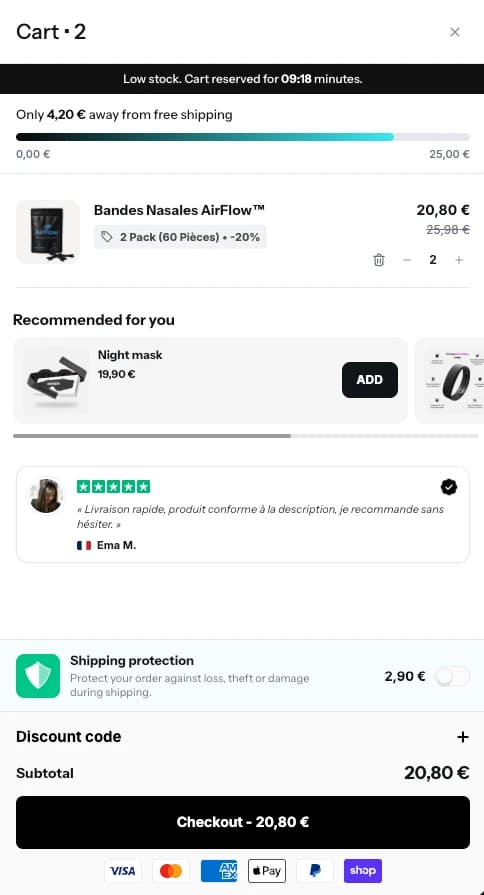
ConvertX Cart Drawer, live
The real module, on one of our demo stores.
The full comparison
Slide cart apps are one of the most crowded corners of the Shopify App Store. The big names get reviewed everywhere, but plenty of merchants end up shortlisting smaller apps that cost less or answer faster on chat. Sale max Slide Cart Drawer and HS Slide Cart Drawer Upsell are two of those: both replace your theme's cart popup with a drawer that carries upsells, a progress bar and a discount field, both sit in the same App Store categories (Cart customization and Upsell and cross-sell), and both have between 100 and 150 reviews. Yet they are built on very different business models, and that difference shapes almost every decision below.
All facts on this page were checked on October 22, 2026, on each app's App Store listing and on the developer's own product or pricing page (see sources). Where a feature only appears as a filter tag on the listing, with no written description, we say so rather than assume it works.
Who makes these two apps
Sale max Slide Cart Drawer
Sale max is published by Gm infotech inc, a developer registered in Beaverton, Oregon. The app launched on the Shopify App Store on July 21, 2023, so it is relatively young. It holds a 4.8 rating from about 130 reviews, with roughly 92% of them at five stars. Most 2026 reviews (from Malaysia, Panama, Poland, Israel, India and the US) praise one thing above all: support that answers within minutes and handles theme tweaks for the merchant.
The positioning is simple and unusual: the app is free. Not freemium, not free up to a number of orders. The developer's page lists a single Free forever plan with all features, unlimited orders and revenue, and states there is no premium tier to unlock. The same developer sells other apps (a Terms and Conditions checkbox app, for instance), which is presumably how the business is funded.
HS Slide Cart Drawer Upsell
HS Slide Cart Drawer is made by Heysenior, a developer based in Lima, Peru. It has been on the App Store since June 1, 2018, which makes it one of the older independent slide carts still active. It is rated 4.5 from about 146 reviews. The split is more polarized than Sale max: around 84% five-star reviews but also around 8% one-star reviews, and several of the negative ones concern slow support or bugs. The developer does reply publicly, including to a July 2026 review.
HS is a classic paid app. Live stores choose between $19.99, $29.99 and $59.99 per month on the App Store, after a 5-day trial. The free plan exists, but only for development and partner stores. In exchange, HS packs more promotional modules: gift wrap, add-ons, a shipping protection toggle, trust badges, payment icons, tiered free gifts and custom JavaScript.
Criterion by criterion
Building and styling the drawer
Sale max leans on a drag-and-drop builder that covers both the slide cart and the full cart page, and the developer says you can arrange widgets, colors and text so the drawer looks like part of your theme. Setup is one step: enable the app embed in the theme editor, and it replaces the default cart popup.
HS promises a cart you can customize without editing theme code, with design settings and a single dashboard for upsells, gifts and discounts. It does not describe a drag-and-drop editor, but it gives developers something Sale max does not document: custom HTML, CSS and JS in every plan. If you have a freelancer who likes to fine-tune things in code, that matters. HS also has a sticky cart feature to keep the cart reachable as shoppers browse. If you want a visual for how to approach drawer layout in general, our guide on customizing a Shopify cart drawer without code walks through the main blocks.
Offers inside the cart
On the core offers, the two are close. Both run a progress bar toward free shipping or a reward, both show product recommendations in the drawer, and both let you set rules that decide which offer appears. Sale max gives a concrete example on its site: shoes in the cart, show socks. You can rely on Shopify's own recommendations or pick products per product or collection.
HS widens the menu. It explicitly supports BOGO promotions, frequently bought together bundles, automatic free gifts based on cart conditions and a tiered free items module. Add the gift wrap and add-ons modules and you get a cart that can run a full holiday campaign on its own. Sale max covers free gifts through its progress bar goals and bundle discounts in the side cart, but with fewer dedicated modules. If gift-with-purchase is central to your promotions, our gift with purchase setup guide helps decide which mechanism you actually need.
Checkout tools: where Sale max pulls ahead
This is the clearest gap. Sale max places order notes, a discount code field and a shipping rate estimate inside the drawer, and its FAQ confirms that PayPal, Shop Pay and Google Pay buttons appear next to the checkout button. For a shopper on mobile, being able to jump straight to Shop Pay from the drawer removes a step.
HS has the discount field, and a Custom notes tag on its listing, but no written mention of order notes, a shipping estimator or express checkout buttons. What it has instead is reassurance content: trust badges and payment icons in the drawer, and a shipping protection toggle. Whether shipping protection is worth offering at all is a separate question, which we cover in shipping protection on Shopify: is it worth it.
Integrations
Sale max lists Judge.me, Loox, Ali Reviews, Reviews.io, Shopify Product Reviews and Yotpo, which mainly matters for showing star ratings on recommended products. HS lists Yotpo on the review side, but more importantly GemPages, PageFly, Shogun, ReCharge and Bold Subscriptions. If your product pages are built with a page builder or you sell subscriptions, HS is the one that has explicitly declared compatibility. Sale max may work fine in those setups, but it does not say so.
International stores
Both listings are in English only and both show Multi-currency and Multi-language tags without explaining how they work. One HS review from July 2026 says the cart did not work with international currency (the developer answered that the app works correctly). If you sell in several currencies through Shopify Markets, test both carts with a foreign currency before going live. Our article on multi-currency carts lists what to check.
Analytics
Neither app documents analytics in writing. Sale max shows click-through rate, conversion rate and recommendation performance tags. HS shows similar tags plus A/B testing and funnel performance, and a screenshot captioned track cart interactions and upsell performance. Treat both as basic until you see the dashboard during setup.
Pricing and long-term cost
Over a year, Sale max costs $0. HS costs at least $239.88 on the BASIC plan billed monthly, and up to $719.88 on ADVANCED. Note that every paid HS plan lists exactly the same features, and the developer site names them For Shopify Basic, For Shopify plan, Shopify Advanced and Shopify Plus, which points to pricing that follows your Shopify plan rather than features. The developer site also shows yearly prices and a $99.99 Shopify Plus tier that does not appear on the App Store listing. Check the plan offered when you install. For the general logic of when paying for an app is justified, see free vs paid Shopify apps.
Support and reliability
Sale max's recent reviews are almost uniformly about fast, hands-on support, including one merchant who says the team spent around six hours on customizations. HS has many positive support reviews too, but also a recurring minority of complaints about unanswered emails. The developer replies to many of them. With a free app the risk is low: you can install Sale max and judge for yourself. With HS, use the 5-day trial to send a support request and see how fast it comes back.
Three store profiles
A new apparel store doing 150 orders a month
Cash matters, the theme is standard (Dawn or a close relative) and the goal is a free shipping bar plus one or two cross-sells. Sale max fits: free, drag-and-drop, express checkout buttons in the drawer, and order notes for gift messages. There is no reason to pay $19.99 a month for modules you will not use.
A gift and homeware brand preparing the holiday season
This store wants gift wrap, tiered free gifts above set cart values, a BOGO on candles and trust badges to reassure first-time buyers. HS Slide Cart Drawer covers all of that in one app, and $29.99 a month during November and December is easy to justify if it lifts average order value. Run the trial early, well before Black Friday traffic.
A supplement brand on PageFly with subscriptions
Product pages are built in PageFly and repeat buyers subscribe through ReCharge. HS is the safer bet because it lists both as compatible, and its custom JS lets a developer handle edge cases. Sale max could be tested on a duplicate theme first, but nothing in its documentation confirms those integrations.
Switching from one to the other
Both apps load through the theme (Sale max through an app embed that replaces the cart popup), so the switch is mostly about avoiding two drawers fighting each other.
- Note your current settings: progress bar thresholds, upsell rules, gift rules and discount behavior. Neither app mentions an import tool from the other.
- Duplicate your live theme and work on the copy.
- Disable the old app's embed in the theme editor on that copy, then enable the new one.
- Rebuild the progress bar and upsell rules, then test with a real cart: discount code, free gift trigger, mobile layout and, if you sell abroad, a foreign currency.
- Publish the theme, then uninstall the old app so its scripts and any recurring charge stop.
Moving from HS to Sale max usually means giving up gift wrap, shipping protection and trust badges in the drawer, but gaining express checkout buttons and a shipping estimator. Moving from Sale max to HS is the reverse, plus a monthly bill. If you are comparing other drawers too, our Kaching Cart Drawer vs Essential Cart Drawer comparison covers two better-known options, and Essential Free Shipping Bar vs Hoppy helps if you only need the progress bar.
Bottom line on the details
The decision comes down to a short question: do you need the extra promotional modules HS offers, or the checkout shortcuts Sale max offers? Sale max wins on price, on checkout tools and on recent review sentiment. HS wins on breadth of offers, on declared integrations with page builders and subscription apps, and on developer flexibility with custom JS. Both are small, independent apps without a Built for Shopify badge, so testing on a duplicate theme before publishing is the sensible move either way.
Frequently asked questions
Yes. As of October 2026 the App Store listing shows a single Free plan, and the developer's site describes it as Free forever with all features, unlimited orders and revenue, and no premium tier to unlock. There is no revenue share either.
Only for development and partner stores. A live store pays after a 5-day free trial: $19.99, $29.99 or $59.99 per month on the App Store listing, billed in USD. The developer's own site also lists a $99.99 Shopify Plus tier and yearly prices.
For most small stores, yes. Sale max is free, rated 4.8 from about 130 reviews, and includes a progress bar, upsells, a discount field, order notes, a shipping estimate and PayPal, Shop Pay and Google Pay buttons. HS is worth paying for only if you need gift wrap, shipping protection, trust badges or page builder compatibility.
Yes, it is a real app published by Heysenior on the Shopify App Store since June 2018, with a 4.5 rating from about 146 reviews. Most reviews are positive, but around 8% are one-star, often about support response times. The developer replies publicly to negative reviews. Use the 5-day trial to test support before committing.
Sale max. Its FAQ states that PayPal, Shop Pay and Google Pay buttons appear in the drawer next to the checkout button. HS Slide Cart Drawer does not mention express checkout buttons on its listing or plans page.
Its App Store listing names GemPages, PageFly, Shogun, ReCharge and Bold Subscriptions under Works with. Sale max does not list page builders or subscription apps, so test it on a duplicate theme if you rely on them.
Yes, if you do it on a duplicate theme: disable the HS embed, enable the Sale max app embed, rebuild your progress bar and upsell rules, test a full cart on mobile, then publish and uninstall HS. Neither app mentions an import tool, so settings are recreated by hand.
How we compare
We make ConvertX, so we have a side. We still try to be fair: every price and feature here comes from the apps’ own listings and docs (see sources), we say where another app is the better pick, and we update pages when apps change.
Spotted something out of date? Tell us at support@convert-x.app.