





 vs
vs
K: Quantity Breaks vs Qikify Volume Discounts: which quantity break app fits your Shopify store?
Short answer
Qikify Volume Discounts is the better pick for most Shopify stores: it is free with no plan limits listed, carries the Built for Shopify badge, holds a 5.0 rating on about 100 reviews, and adds BOGO, free gifts, mix and match and subscription tiers. K: Quantity Breaks by Kaktus (4.8 on about 40 reviews, live since 2022) suits merchants who want a simple tiered table with a built-in conversion and revenue dashboard and accept paying $9.99 to $19.99 a month depending on order volume.
Facts checked on October 22, 2026
Which one fits your store?
Choose K: Quantity Breaks if…
- You want a per offer dashboard with views, add to carts, conversion rate and revenue
- You want to enter Facebook, Pinterest, Snapchat and Google Analytics IDs in the app settings
- You only need simple tiers on one product, with three ready made widget templates
- You also sell on WooCommerce, Wix or Squarespace and want the same vendor everywhere
- You prefer an app with a track record on the App Store since May 2022

Choose Qikify Volume Discounts if…
- You want to pay nothing: the listing shows Free with no paid plan or order cap
- You may add BOGO, free gifts, mix and match or multipacks later
- You sell wholesale with many variants or also use Shopify POS
- You build pages with PageFly, Foxify or GemPages
- You want an admin in French, German, Spanish or another of its nine languages
K: Quantity Breaks vs Qikify Volume Discounts: feature by feature
| Feature |  K: Quantity Breaks K: Quantity Breaks |  Qikify Volume Discounts Qikify Volume Discounts |
|---|---|---|
| Offers | ||
| Quantity breaks on a single productBoth apps show a tiered table on the product page and apply the matching discount, which is the core job of this category. | Yes | Yes |
| Percentage or fixed amount offKaktus lists percent and amount off discounts. Qikify lists percentage, fixed amount and tiered pricing structures. | Yes | Yes |
| Number of tiersKaktus explicitly lists Unlimited Pricing Tiers. Qikify's sources describe tiered pricing but do not state a maximum or say unlimited. | YesUnlimited | Not stated |
| BOGO and Buy X Get YQikify documents Buy X Get Y offers. BOGO is not listed on the Kaktus App Store page or product page. | No | Yes |
| Free gift per tierQikify lists free gifts tied to tiers. Free gifts are not listed on the Kaktus App Store page. | No | Yes |
| Mix and match and multipacksQikify supports mix and match combos with percentage or fixed total pricing, plus multipacks. Not listed for Kaktus. | No | Yes |
| Wholesale and member pricingKaktus mentions wholesale, VIP and member pricing tiers in its listing. Qikify has a dedicated wholesale offer showing several variants and quantities in one view. | Partly | Yes |
| Subscription productsQikify can combine volume tiers with Subscribe and Save options when a subscription app is installed. Not listed on the Kaktus App Store page. | No | Yes |
| Targeting | ||
| Offer triggersBoth cover product and collection targeting. Kaktus adds an any product trigger; Qikify's launch article adds tagged items. | Specific products, any product, collection | Products, collections, tags |
| Scheduling and limited time offersQikify campaigns take start and end dates. Kaktus promotes limited time offers and has a countdown timer option, but date scheduling is not described in its docs. | Partly | Yes |
| Setup and design | ||
| AI offer creationQikify lets you type a prompt describing the offer and an AI assistant drafts it. Kaktus has no AI builder listed. | No | Yes |
| Widget templates and stylingKaktus ships Default, Modern and The Sun templates. Qikify offers smart presets, savings badges and progress indicators with color, font and layout control. | 3 templates, colors and fonts | Presets, badges, progress indicators |
| Custom CSSQikify documents a custom CSS option. Custom CSS is not listed on the Kaktus App Store page or in its documentation excerpts. | No | Yes |
| Storefront text translationKaktus has a Translation tab for widget texts. Qikify has a help article on translating offers. | Yes | Yes |
| Admin languagesKaktus is listed in English only. Qikify is listed in English, French, German, Spanish, Italian, Japanese, Vietnamese and two Portuguese variants. | English | 9 languages |
| Analytics and integrations | ||
| Built-in offer analyticsKaktus reports popup views, add to carts, conversions, conversion rate and revenue. Qikify mentions analytics integration without describing the reports. | Yes | Partly |
| Ad pixel and GA settingsKaktus settings accept Facebook, Pinterest, Snapchat and Google Analytics IDs. Not listed on the Qikify App Store page. | Yes | No |
| Shopify POSPOS appears in Qikify's Works with list. POS is not listed on the Kaktus App Store page. | No | Yes |
| Page buildersQikify lists PageFly, Foxify and GemPages. No page builder is listed on the Kaktus App Store page. | No | Yes |
| Built for Shopify badgeQikify carries the Built for Shopify badge on its listing. Kaktus does not show it on this app's listing. | No | Yes |
| Pricing and support | ||
| Free plan for a live storeKaktus is free only on development stores. Qikify is listed as Free, with no paid plan found in any source. | No | Yes |
| Paid plansKaktus prices by monthly orders: $9.99 up to 9 orders, $19.99 up to 100. Its website shows tiers up to $69.99 for 1,001+ orders. | $9.99 to $19.99/mo on the listing | None listed |
| Rating and reviewsBoth are well rated. Qikify has more reviews and a higher average; Kaktus reviews include one 1 star complaint about billing, answered by the developer. | 4.8 from about 40 reviews | 5.0 from about 100 reviews |
| Time on the App StoreKaktus has more than four years of history on this app. Qikify's app is about one year old, though the publisher has other established apps. | Since May 2022 | Since September 2025 |
Pricing
K: Quantity Breaks- Free$0Development stores only
- Growth$9.99/moUp to 9 Shopify store orders per month, 7 day free trial
- Growth 2$19.99/moUp to 100 Shopify store orders per month, 7 day free trial
Plans from the App Store listing. The Kaktus website shows higher usage tiers, from $29.99 (101 to 300 orders) to $69.99 (1,001+ orders) a month.
App Store listing ↗Qikify Volume DiscountsFree plan- Free$0All features, no paid plan or limit listed
The listing shows Free only, and Qikify's launch article says all features are free with no limitations. Pricing could change later.
App Store listing ↗Prices as listed on the Shopify App Store on October 22, 2026, before taxes. Check each listing for the latest.
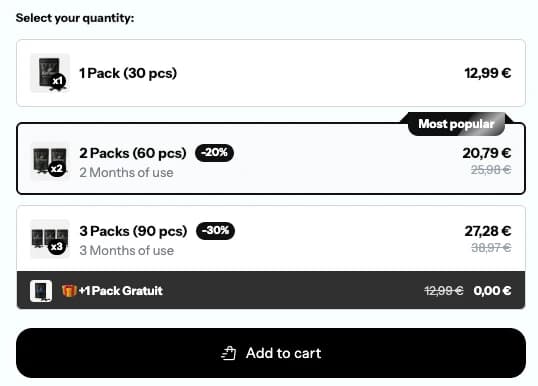
ConvertX Bundles, live
The real module, on one of our demo stores.
The full comparison
Quantity breaks are one of the oldest tricks in retail: buy two and save 10 percent, buy four and save 20. On Shopify, this category is crowded with a few heavily reviewed apps, so most merchants never scroll past the first page of search results. K: Quantity Breaks by Kaktus and Qikify Volume Discounts live further down that list. Both are small, both are well rated, and both do the core job: show a tiered discount table on the product page and apply the right price at checkout. Where they split is the price model, the range of offers, and how long each one has been around.
Everything on this page was checked on October 22, 2026 against the two App Store listings, the Kaktus product, pricing and documentation pages, and Qikify's launch article and help center. When a feature does not appear in those sources, we say it is not listed instead of guessing.
Who is behind each app
K: Quantity Breaks, Discounts (Kaktus)
Kaktus is a small studio that publishes several conversion widgets for Shopify, including a sales pop up app, and also sells its tools for WooCommerce, Wix, Squarespace, Webflow and a dozen other platforms. The quantity break app went live on the Shopify App Store on May 12, 2022. It holds a 4.8 rating from about 40 reviews. The listing pitches it for "flexible tiered pricing and volume discounts" and mentions B2B, wholesale and members pricing. The admin is available in English only, and the app does not carry the Built for Shopify badge.
Qikify Volume Discounts Bundle
Qikify is a better known Shopify publisher with a family of apps: upsell and free gift, sticky cart, checkout customizer and more. Its volume discount app is young. It launched on September 12, 2025 and gathered roughly 100 reviews with a 5.0 average in about a year. It carries the Built for Shopify badge, which means Shopify reviewed it against its performance and design requirements. The admin is translated into nine languages, including French, German, Spanish, Italian, Japanese and Portuguese.
Pricing: the gap that decides most cases
Kaktus charges by monthly orders
On the App Store listing, the free tier only applies to development stores. A live store picks one of two paid plans, each with a 7 day free trial:
- Growth at $9.99 per month, for up to 9 Shopify store orders per month
- Growth 2 at $19.99 per month, for up to 100 Shopify store orders per month
Both plans include the same features. The Kaktus website shows a longer usage table that keeps climbing past 100 orders: $29.99 for 101 to 300 orders, up to $69.99 for more than 1,001 orders a month. The App Store listing does not show those higher tiers, so if your store is above 100 orders a month, ask Kaktus support which price applies before you install.
Qikify is free
The listing shows a single price: Free. Qikify's launch article goes further, under a heading that reads "All features, completely free", and says there are no limitations, hidden costs or feature restrictions. We found no paid plan, order cap or offer cap in any source. One caution: free apps sometimes add paid plans later, and Qikify's other apps do have paid tiers. Check the listing before you commit, and again every few months.
What that means in dollars
A store doing 80 orders a month pays $19.99 a month with Kaktus, about $240 a year, and nothing with Qikify. For a small store, that difference can be a meaningful share of the extra margin a quantity break is meant to bring in. Our piece on free vs paid Shopify apps explains when paying still makes sense.
Offer types
Kaktus: one job, done simply
Kaktus focuses on tiers for a single product. You set as many tiers as you want (the listing says "Unlimited Pricing Tiers"), choose a percentage or a fixed amount off, and pick a trigger: specific products, any product, or a specific collection. A countdown timer option helps run limited time offers, and the listing mentions member only and VIP pricing tiers. BOGO, free gifts, mix and match bundles and subscription products are not listed on its App Store page or its product page.
Qikify: quantity breaks plus a bundle toolkit
Qikify covers the same single product quantity breaks, then adds several other offer types documented in its help center:
- Multibuy or mix and match combos, with a percentage off or a fixed total price
- Multipacks and sample packs
- Buy X Get Y and free gifts per tier
- Free shipping and cart discounts for bulk orders
- A wholesale pricing offer that shows several variants and quantities in one view
- Volume tiers on subscription products, as long as you already run a subscription app
If all you want is "buy more of this item, pay less", both apps do it. If you expect to test bundles or gifts later, Qikify saves you a second install. For pricing logic, see our guide to bundle pricing without killing margin.
Building an offer
Kaktus setup
The Kaktus documentation describes a short flow: create a volume offer, choose the trigger products, add the quantity and discount options, add conditions, then publish. The widget appears once you enable the app embed in the theme editor. The product page says the discount "will be applied on the checkout page". The listing also shows a Sidekick integration.
Qikify setup
Qikify lets you build an offer by hand or type a prompt describing it to an AI assistant, which then drafts the offer. Smart presets speed up common setups. Campaigns accept start and end dates, which is handy for a seasonal push like the ones in our flash sales guide. The listing says discounts are "native to Shopify discount", and the help center documents a Sidekick integration too.
Storefront design
Kaktus ships three widget templates named Default, Modern and The Sun. You can adjust colors, font sizes and styles, edit every string in a Translation tab, and set the widget position or custom cart selectors in settings.
Qikify describes discount badges, savings calculators and progress indicators, with control over colors, fonts, layout and position, plus a custom CSS field. One September 2026 review notes that some options could not be edited in the offer settings and had to be changed in theme code, so plan a few minutes for fine tuning if your design is strict.
Analytics and tracking
This is where Kaktus clearly leads. Its dashboard reports popup views, add to cart events, conversions, conversion rate and revenue for each offer. Settings accept Facebook, Pinterest, Snapchat and Google Analytics IDs, IP exclusions and email notifications. If you run paid traffic and want to read offer performance without opening another tool, that is useful.
Qikify's launch article mentions "analytics integration", but neither the listing nor the help center previews describe what the reports contain. We could not confirm the depth of its reporting from public sources.
Integrations and compatibility
Qikify lists Checkout, Shopify Admin, POS, PageFly, Foxify, GemPages and Product options under "Works with", and says it supports agentic commerce. That matters if you sell in a physical shop too, or if your product pages are built with a page builder.
Kaktus lists Checkout and Sidekick. POS, page builders and Shopify Markets are not listed. Neither app states in its public sources how its discounts combine with other discount codes, so test a cart with your usual promo code before going live.
Support and reviews
Kaktus reviews from 2022 and 2023 praise fast, helpful support, and the most recent review, from September 2026, is positive. One 1 star review from October 2024 complains about being charged for months without using the app. Kaktus replied that charges go through Shopify billing and must be approved by the store owner. The general lesson: uninstall any app you stop using, since that ends its Shopify charge.
Qikify reviews from mid and late 2026 mention support reps by name, quick bug fixes and features added on request. The rating is a near perfect 5.0, but the track record is about one year long, against more than four years for Kaktus.
Three store profiles
A single product supplement brand at 60 orders a month
The goal is "buy 2, save 10 percent; buy 3, save 15 percent" on one hero product. Both apps handle it. Qikify costs nothing, which leaves budget for ads. Kaktus at $19.99 a month earns its place only if you will actually use its per offer conversion and revenue dashboard and its pixel settings to steer campaigns.
A craft supplies wholesaler with many variants and a physical counter
This store needs price tiers on dozens of colors and sizes, plus discounts at the counter. Qikify's wholesale pricing offer shows several variants and quantities in one view, and POS appears in its compatibility list. Kaktus mentions wholesale pricing in its listing but does not describe a variant grid or POS support.
A merchant running Shopify and a WooCommerce store side by side
Kaktus sells the same family of widgets on WooCommerce, Wix, Squarespace and other platforms. If you want one vendor and one way of working across two storefronts, that is a real reason to pick it, as long as your Shopify volume fits its order based pricing.
Switching from one app to the other
From Kaktus to Qikify
- Write down every active tier: products, quantities, discount values and schedules.
- Install Qikify and rebuild the offers, by hand or with the AI prompt.
- Turn off the Kaktus app embed in the theme editor so two tables do not stack on the product page.
- Uninstall Kaktus, then check Shopify billing to confirm the charge has stopped.
- Place a test order with several quantities and with your usual discount code.
From Qikify to Kaktus
You would do this if Qikify introduced paid plans that no longer suit you, or if you want Kaktus's conversion reporting. Rebuild the tiers in Kaktus, enable its app embed, then remove Qikify. After uninstalling, look through the Discounts section of your Shopify admin and delete any discount left behind so old tiers do not keep applying.
Whichever app you keep, run only one quantity break app at a time. Two widgets on the same page confuse shoppers and slow the page down, as explained in our article on app bloat and site speed. If you are also weighing the two best known apps in this space, our Kaching Bundles vs Wide Bundles comparison covers them.
Frequently asked questions
Yes, as of October 2026. The App Store listing shows a single price, Free, and Qikify's launch article says all features are completely free with no limitations or hidden costs. We found no paid plan or order cap. Free apps can add paid plans later, so check the listing from time to time.
Only for development stores. A live store needs Growth at $9.99 a month (up to 9 orders a month) or Growth 2 at $19.99 a month (up to 100 orders a month), both with a 7 day free trial. The Kaktus website shows higher tiers above 100 orders, up to $69.99 a month.
For most stores, yes: it is free, Built for Shopify, rated 5.0 on about 100 reviews, and it adds BOGO, free gifts, mix and match, wholesale and POS support. Kaktus is the better fit if you want its built-in conversion and revenue dashboard and ad pixel settings, and the monthly fee is not an issue.
Yes. It has been on the Shopify App Store since May 2022 with a 4.8 rating from about 40 reviews, many praising fast support. One 2024 review complained about being billed while not using the app; Kaktus replied that charges go through Shopify billing. Uninstalling an app you no longer use stops its charge.
Yes. Its listing and help center cover Buy X Get Y, free gifts per tier, mix and match combos, multipacks, free shipping and cart discounts, on top of standard quantity breaks. Kaktus focuses on tiered discounts and does not list these offer types.
Kaktus, based on public sources. Its dashboard shows popup views, add to carts, conversions, conversion rate and revenue per offer, and it accepts Facebook, Pinterest, Snapchat and Google Analytics IDs. Qikify mentions analytics integration but does not describe its reports publicly.
Qikify lists Shopify POS in its compatibility list, along with PageFly, Foxify and GemPages. POS is not listed on the Kaktus App Store page, so do not count on in-store discounts with Kaktus without asking its support first.
How we compare
We make ConvertX, so we have a side. We still try to be fair: every price and feature here comes from the apps’ own listings and docs (see sources), we say where another app is the better pick, and we update pages when apps change.
Spotted something out of date? Tell us at support@convert-x.app.
Sources
- K: Quantity Breaks on the Shopify App Store
- K: Quantity Breaks reviews
- Kaktus Volume Pricing product page
- Kaktus Volume Pricing pricing page
- Kaktus Volume Pricing documentation
- Qikify Volume Discounts on the Shopify App Store
- Qikify Volume Discounts reviews
- Qikify Volume Discounts launch article
- Qikify Volume Discounts help center