


 vs
vs
Bundler vs ConvertX: which bundle app fits your Shopify store?
Short answer
If bundles are the only thing you need, Bundler is the stronger pick: its free plan already covers quantity breaks and Buy X Get Y with no revenue cap, Mix & Match costs $9.99/month, and it works with Shopify POS. ConvertX makes more sense when bundles are one piece of a wider setup: for $19.99 to $34.99/month it adds a cart drawer, sticky add to cart, upsells, stories and trust icons in one app, so you can drop several subscriptions.
Facts checked on October 13, 2026
Which one fits your store?
Choose Bundler if…
- You only need bundles and quantity breaks, and want to pay nothing for them
- You want Mix & Match, build-a-box or gift box offers
- You sell in a physical shop and need Shopify POS support
- You run subscriptions with Seal Subscriptions or subscription products
- You want an app with a long public track record (2,700+ reviews since 2019)

Choose ConvertX if…
- You would otherwise install separate apps for bundles, cart drawer, sticky add to cart and trust icons
- You want revenue, clicks and checkouts tracked per module in one dashboard
- You want to describe offers in plain language and let ConvertX AI build them
- You want shoppable video stories or ready-made theme sections in the same app
- Your theme has no cart drawer with a free-shipping bar or shipping protection
Bundler vs ConvertX: feature by feature
| Feature |  Bundler Bundler |  ConvertX ConvertX |
|---|---|---|
| Bundle offers | ||
| Quantity breaks and volume discountsBoth apps show tiered quantity offers above the add-to-cart button. Bundler includes them on its free plan; on ConvertX they start with the $19.99 Essential plan. | Yes | Yes |
| Mix & Match bundlesBundler offers Mix & Match, including tiered and sectioned versions, from $9.99/month. ConvertX's bundle module focuses on quantity and multi-pack offers; mix and match is not listed in its docs. | YesPremium plan | No |
| Fixed bundles of different productsBundler builds classic multi-product bundles with one bundle price. ConvertX covers complementary products through its Upsells module (frequently bought together, one-click add-ons). | Yes | Partly |
| Buy X Get Y and free giftsBundler has Buy X Get Y on its free plan and lists free gifts. ConvertX supports free gifts on product pages, but Buy X Get Y is not listed as a rule type. | Yes | Partly |
| Product page upsellsBoth show upsells on the product page. ConvertX adds frequently bought together blocks and one-click add-ons as a dedicated module. | Yes | Yes |
| Free shipping incentiveBundler can grant free shipping when a bundle is bought. ConvertX shows shoppers how far they are from your free-shipping threshold inside its cart drawer. | Free shipping as a bundle reward (Premium) | Free-shipping progress bar in the cart |
| Cart and page | ||
| Full cart drawerConvertX's drawer includes a progress bar, timer, recommendations, shipping protection, discount code and payment icons. Bundler lists cart upsells, but none of those drawer features. | Partly | Yes |
| Sticky add to cart barConvertX includes a sticky add-to-cart bar for mobile and desktop. Bundler does not list one; it focuses on offers rather than page elements. | No | Yes |
| Shoppable video storiesConvertX shows vertical videos (UGC, demos, unboxings) on product pages. This is outside Bundler's scope. | No | Yes |
| Payment and trust iconsConvertX places payment logos under the buy button and in the cart. Bundler stores would use their theme or another app for this. | No | Yes |
| Theme sections libraryConvertX Premium includes ready-made sections and blocks such as testimonials, FAQ, comparison tables and delivery dates. Bundler does not offer theme sections. | No | Premium plan |
| AI offer builderConvertX AI builds offers from a plain-language request and publishes only after you confirm. No AI builder is listed on Bundler's App Store page. | No | Yes |
| Data and targeting | ||
| AnalyticsBundler's revenue, AOV and conversion graphs require the Executive plan. ConvertX tracks clicks, add-to-carts, checkouts and revenue per module from its first plan. | Executive plan ($19.99/mo) | Basic on Essential, advanced on Premium |
| Targeting rulesBundler uses discount conditions and custom rules. ConvertX targets by product, collection, device or market, with advanced targeting on Premium. | Partly | Yes |
| Storefront translationsBundler lets you localise bundle offers in several languages. On ConvertX, translations are part of the Premium plan. | Yes | Premium plan |
| Compatibility | ||
| Shopify POSBundler works with Shopify POS, useful for stores with a physical shop. POS is not listed on ConvertX's App Store page. | Yes | No |
| Subscription appsBundler lists Seal Subscriptions and subscription products. ConvertX does not list subscription compatibility; check with its support first. | Yes | No |
| Built for Shopify badgeBundler carries Shopify's Built for Shopify badge, which requires meeting performance and design standards. ConvertX does not have it yet. | Yes | No |
| Pricing and support | ||
| Free plan for live storesBundler's free plan has unlimited orders and revenue. ConvertX is free only on development stores; live stores start at $19.99/month after a 7-day trial. | Yes | No |
| Revenue limitsBundler never charges more as bundle revenue grows. ConvertX Essential covers up to $1,000 of additional revenue per month; Premium removes the limit. | None on any plan | $1,000/mo extra revenue on Essential |
| Entry paid planBundler's first paid tier unlocks Mix & Match. ConvertX's first tier includes every module and ConvertX AI, but caps active modules at 4. | $9.99/month | $19.99/month or $143/year |
| Module limitConvertX counts active modules: bundles, upsells, cart drawer, sticky bar and payment icons together make 5, which requires Premium at $34.99/month. | Not applicable | 4 on Essential, unlimited on Premium |
| Reviews on the App StoreBundler has been listed since July 2019 and has a large review base. ConvertX launched in September 2025, so its rating rests on very few reviews. | 4.9 from 2,729 reviews | 5.0 from 3 reviews |
| Admin languagesBoth admins are available in French. Bundler covers more languages, including Japanese, Arabic and Chinese. | 17 languages | English, French, Spanish, German |
Pricing
BundlerFree plan- Free$0Quantity breaks, Buy X Get Y, volume discounts, product page upsells, Shopify POS, unlimited revenue
- Premium$9.99/moMix & Match, quantity break combinations, landing pages, free shipping, funnel upsells
- Executive$19.99/moBundle analytics: total revenue, AOV, conversions, applied discounts, top bundles
7-day free trial on paid plans. No revenue limit on any plan. Billed in USD by Shopify.
App Store listing ↗ConvertX- Essential$19.99/mo or $143/yrAll modules and ConvertX AI, up to 4 active modules, up to $1,000 extra revenue per month, basic analytics
- Premium$34.99/mo or $299/yrUnlimited modules and revenue, advanced analytics and targeting, translations, theme sections, AI Store Builder
7-day free trial, 0% commission, billed in USD by Shopify. Free only on development stores.
App Store listing ↗Prices as listed on the Shopify App Store on October 13, 2026, before taxes. Check each listing for the latest.
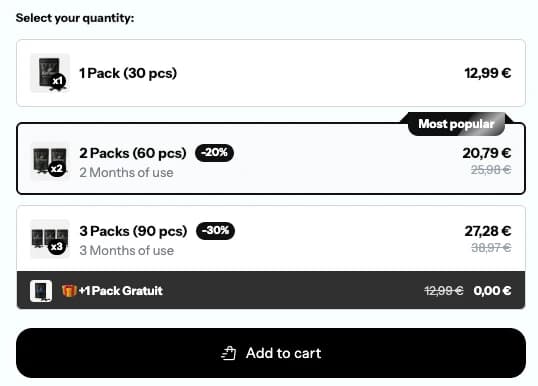
ConvertX Bundles, live
The real module, on one of our demo stores.
The full comparison
The short answer
Bundler and ConvertX both put bundle offers on your product pages, but they are built for different jobs. Bundler is a specialist: almost everything it does revolves around bundles, quantity breaks and discount rules. ConvertX is a generalist: bundles are one module next to upsells, a cart drawer, a sticky add-to-cart bar, payment icons, shoppable stories and theme sections.
So the real question is not which app is "better". It is whether you are looking for a bundle tool, or for one app that replaces several conversion tools. This page goes through both cases with the numbers from each app's Shopify App Store listing, checked on October 13, 2026.
Who is behind each app
Bundler has been on the Shopify App Store since July 2019. It carries the Built for Shopify badge, a 4.9 rating from 2,729 reviews at the time of writing, and an admin available in 17 languages. That history matters: many edge cases (discount stacking, multi-currency, POS) have already been hit and fixed by thousands of merchants before you.
ConvertX launched in September 2025. It has a 5.0 rating, but from 3 reviews, and it does not have the Built for Shopify badge. Its admin is available in English, French, Spanish and German. A young app is not automatically a risk, but you should weigh a long public track record against a short one, especially if bundles drive a large share of your revenue.
Bundle offers: where Bundler is ahead
Quantity breaks and volume discounts
Both apps handle the classic "buy 1, buy 2, buy 3 and save more" block above the add-to-cart button. ConvertX presents it as multi-pack offers (1, 2 or 3 packs, with a "most popular" badge on the tier you want to push). Bundler offers the same idea with flexible volume conditions and percentage, fixed-amount or fixed-price discounts.
The difference is cost. On Bundler, quantity breaks are part of the free plan, with unlimited orders and no cap on the revenue the app generates. On ConvertX, there is no free plan for live stores: you start at $19.99 per month. If a quantity break block is literally all you need, Bundler wins on price, and it is not close.
Mix & Match, build-a-box and fixed bundles
This is Bundler's strongest area. From the Premium plan at $9.99 per month, you get Mix & Match bundles, including tiered and sectioned versions, quantity break combinations, variant-level bundles and dedicated bundle landing pages. Its listing also covers build-a-box, gift boxes, sample packs and subscription boxes.
ConvertX's bundle module is centred on quantity and multi-pack offers on a single product. Complementary products are handled by the Upsells module (frequently bought together, one-click add-ons) rather than by a "pick any 3 from this collection" builder. Mix and match is not listed in ConvertX's documentation. If your offer is "build your own box of 6 snacks", Bundler is the tool for that. We cover the format itself in our guide to mix and match bundles on Shopify.
Buy X Get Y and free gifts
Bundler includes Buy X Get Y on its free plan and lists free gifts among its offers. ConvertX supports free gifts added directly on product pages, but Buy X Get Y as a rule type is not listed on its App Store page. For a store that runs a lot of "buy 2, get the third free" promotions, Bundler is again the more complete option.
Beyond the bundle: where ConvertX is different
A cart drawer that does more than list items
ConvertX includes a full cart drawer: a free-shipping progress bar, a timer, product recommendations, shipping protection, a discount code field and payment icons. Bundler's listing mentions cart upsells and showing its offers in the cart, but it does not list a drawer with a progress bar, timer or shipping protection. In practice, a Bundler store that wants those features adds a dedicated cart app on top.
Sticky add to cart, stories, trust icons and sections
The rest of ConvertX's modules have no equivalent in Bundler, which never claimed to cover them:
- a sticky add-to-cart bar that follows the scroll on mobile and desktop;
- payment and trust icons under the buy button and in the cart;
- shoppable vertical video stories (UGC, demos, unboxings) on product pages;
- a library of ready-made theme sections and product blocks (testimonials, FAQ, comparison table, delivery date, stock), on the Premium plan.
ConvertX AI
ConvertX lets you describe an offer in plain language. The AI analyses the store, builds the bundle, upsell, cart or section, and publishes only after you confirm. It never edits the live theme directly. No comparable AI builder appears on Bundler's App Store page. Whether this matters depends on you: if you already know exactly what you want, a classic form is just as fast.
Pricing, compared without spin
Plan | Bundler | ConvertX |
|---|---|---|
Free | Yes, unlimited revenue and orders | No (development stores only) |
First paid plan | Premium, $9.99/month | Essential, $19.99/month or $143/year |
Second paid plan | Executive, $19.99/month | Premium, $34.99/month or $299/year |
Revenue limit | None on any plan | $1,000 extra revenue per month on Essential, none on Premium |
Trial | 7 days on paid plans | 7 days on both plans |
Two details deserve attention.
First, Bundler's analytics (total revenue, average order value, conversions, applied discounts, best performing bundles) sit on the Executive plan at $19.99. So a Bundler store that wants to measure its bundles pays the same monthly price as ConvertX Essential, which includes basic analytics for every module.
Second, ConvertX Essential is capped at 4 active modules and $1,000 of additional revenue per month. A store running bundles, upsells, cart drawer, sticky add to cart and payment icons together needs 5 modules, so Premium at $34.99. And if your offers bring in more than $1,000 a month in extra revenue, you also move to Premium. Bundler never charges more as your bundle revenue grows.
Here is what that looks like for common needs:
What you want | Bundler | ConvertX |
|---|---|---|
Quantity breaks only | $0 | $19.99/month |
Mix & Match bundles | $9.99/month | Not covered |
Bundles with revenue analytics | $19.99/month | $19.99/month |
Bundles + cart drawer + sticky bar + upsells | Bundler plan plus separate cart and sticky apps | $19.99 or $34.99/month depending on modules and revenue |
For protecting margin on the offers themselves, see our piece on bundle pricing strategy. ConvertX's full plan details are on the pricing page.
Analytics and targeting
ConvertX tracks clicks, add-to-carts, checkouts and attributed revenue per module, and lets you target modules by product, collection, device or market (advanced targeting is a Premium feature). That is useful when you run several modules and want to know which one actually pays for itself.
Bundler's reporting focuses on bundle performance: revenue, average order value, conversion and discount graphs, and the most popular bundles. Targeting works through discount conditions and custom rules. For a bundles-only store, that is enough. For a store juggling five conversion tools, having one dashboard for all of them is ConvertX's main practical advantage.
Integrations
Bundler works with Shopify POS, Checkout, Seal Subscriptions, subscription products, PageFly, Cartbot and multi-currency converter apps. If you sell in a physical shop or run a subscription programme, that compatibility is a real reason to choose it.
ConvertX lists Checkout and the Shopify admin. POS and subscription compatibility are not listed, so check with ConvertX support before relying on either.
Three store profiles
A coffee roaster selling 250 g and 1 kg bags, with a market stall on weekends. Bundler. Quantity breaks are free, POS covers the stall, and the roaster can add a "pick 3 origins" Mix & Match box for $9.99 later.
A skincare brand whose theme already has a decent cart, testing "buy 2, get 1 free". Bundler again. Buy X Get Y is on the free plan, and there is no reason to pay for modules the store will not use.
A store running paid traffic to product pages, with no cart drawer, no sticky bar and no trust icons. ConvertX. One app covers the product page offer, the drawer, the sticky bar and the icons, and the per-module analytics show what each piece adds. Essential is enough until the store passes 4 modules or $1,000 of extra monthly revenue.
Switching between the two
Moving in either direction follows the same steps:
- List every live offer: products, tiers, discount values, start and end dates.
- Recreate them in the new app before removing anything from the old one.
- Never leave two bundle widgets on the same product page. Shoppers see duplicated offers, and discounts can stack in ways you did not plan.
- Remove the old app's blocks or embeds in the theme editor, then uninstall it.
- Place a few test orders covering each tier and check the discount lines at checkout.
Both apps offer a 7-day trial on paid plans, which is enough to rebuild your offers and compare results on real traffic before paying.
Bottom line
Pick Bundler if bundles are the job. It is cheaper at every level for that use, it goes further on bundle formats, and it has years of public reviews behind it. Pick ConvertX if bundles are one part of a broader conversion setup and you would otherwise pay for a cart drawer, a sticky bar and trust icons separately. For a wider view of the category, our comparison of the best Shopify bundle apps covers more options.
Frequently asked questions
Yes. Bundler's free plan includes quantity breaks, volume discounts, Buy X Get Y, product page upsells, auto-applied discounts and Shopify POS, with unlimited orders and no limit on the revenue it generates. Paid plans add Mix & Match and landing pages ($9.99/month) and analytics ($19.99/month).
Not for live stores. ConvertX is free on development stores only. Live stores choose Essential at $19.99/month (or $143/year) or Premium at $34.99/month (or $299/year), both with a 7-day free trial and 0% commission on sales.
Mix and match is not listed in ConvertX's documentation. Its bundle module focuses on quantity and multi-pack offers on a product, and complementary products go through the Upsells module. If you need pick-your-own bundles, Bundler offers them from $9.99/month.
ConvertX takes no commission. The Essential plan covers up to $1,000 of additional revenue per month and 4 active modules; beyond that you need Premium at $34.99/month, which has no limit. Bundler has no revenue limit on any plan.
Bundler lists Shopify POS support on its App Store page, so bundle discounts can apply in a physical shop. POS is not listed for ConvertX.
Nothing prevents it, for example Bundler for bundle offers and ConvertX for the cart drawer and sticky bar. Just make sure only one app shows bundle offers on a given product page, otherwise shoppers see duplicate offers and discounts can stack.
How we compare
We make ConvertX, so we have a side. We still try to be fair: every price and feature here comes from the apps’ own listings and docs (see sources), we say where another app is the better pick, and we update pages when apps change.
Spotted something out of date? Tell us at support@convert-x.app.